


Your first access review doesn't need to be perfect. It needs to be done, documented, and better than the one before it. In this guide, we walk through the five-step process that launches a first review in three to eight weeks, whatever your tooling, and flag the mistakes that sink most first attempts.
Already past your first few reviews? This is the beginner's path. If you're scaling coverage, handling edge cases, and optimizing cycles, go to the advanced guide to carrying out user access reviews instead.
Your CISO just announced: "We're implementing quarterly access reviews. The first one launches in 3 weeks."
You're the IT manager tasked with making it happen. You open a spreadsheet. Then you realize you don't know all the apps your company uses (your IdP shows 80, but Finance's expense reports show 150+). You don't know who should review what: managers, app owners, or security. You don't know what "good" looks like. And you definitely don't know what happens after the review, when someone has to actually remove the access.
The problem isn't understanding why you need user access reviews. It's understanding how to launch one without drowning in complexity. Organizations that wait for the perfect process never start; organizations that start with a simple process improve every quarter. And the cost of staying stuck is measurable: in our survey of 215 security and IT leaders, 38% spend five to seven days on every review cycle, and 41% of fully manual organizations regularly miss their deadlines.
The process below works whether you're doing this manually, with basic automation, or on a full user access review platform. The sequence stays the same; only the timeline and effort change. And if you're new to the broader topic, our complete guide to user access reviews covers the what and why; this article is the how.
The 5 Steps at a Glance
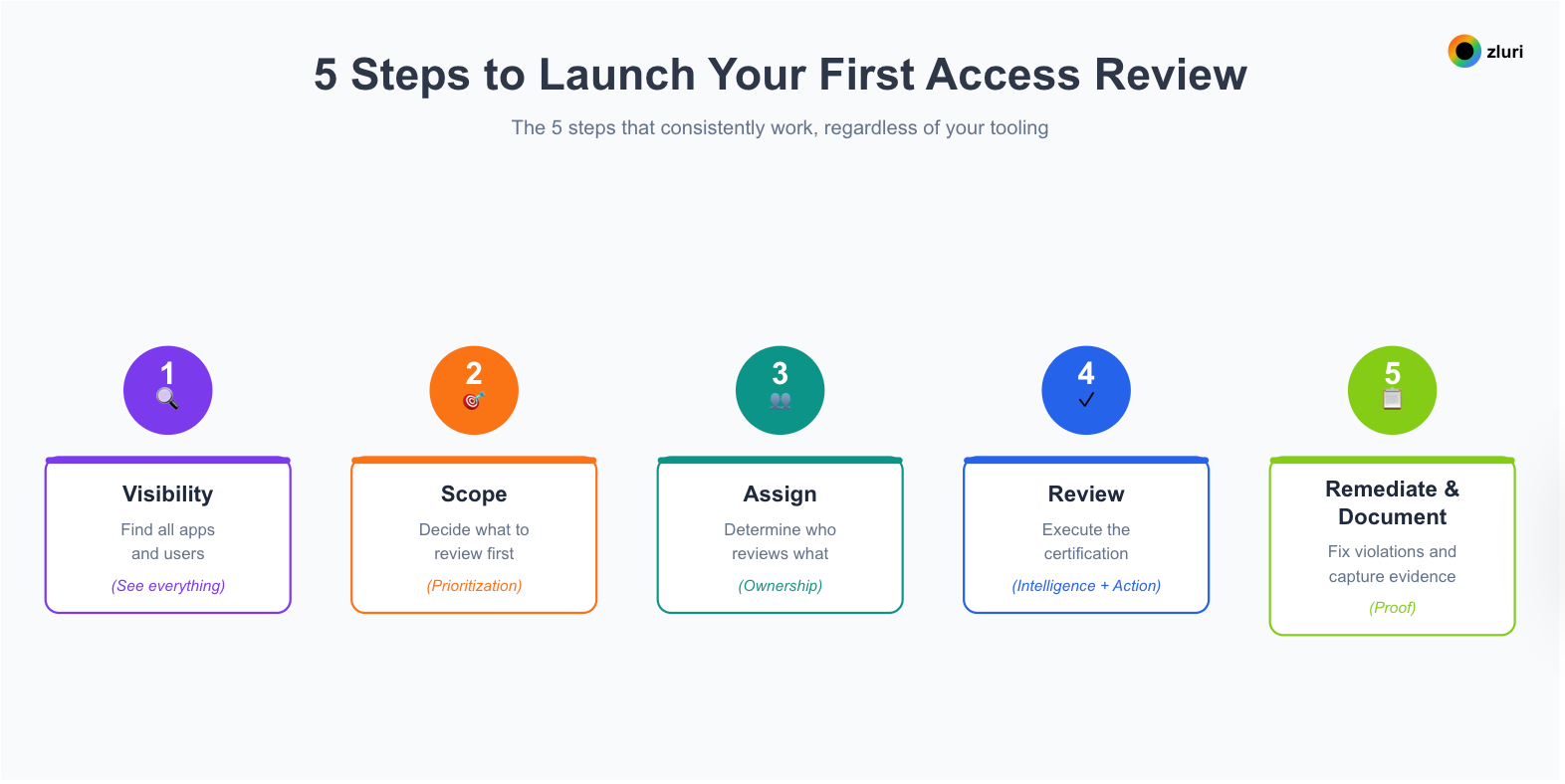
- Visibility → Find all apps and users (see everything)
- Scope → Decide what to review first (prioritization)
- Assign → Determine who reviews what (ownership)
- Review → Execute the certification (intelligence + action)
- Remediate & Document → Fix violations and capture evidence (proof)
Each step builds on the previous one. You can't review without a scope, and you can't scope what you can't see. The sequence matters more than the tooling.
Step 1: Visibility (See Everything)
You can't review what you can't see. Your IdP says 80 apps. Finance's expense reports show 156 subscriptions. Broader discovery methods detect 200+ in actual use. All three numbers are right, for different definitions of "apps we use."
What full visibility surfaces beyond the SSO-integrated core: shadow IT purchased on personal or corporate cards, free trials that quietly became paid subscriptions, developer tools accessed via personal accounts, and department purchases where Marketing bought HubSpot and Support bought Zendesk without a procurement ticket between them.
Three discovery approaches, in increasing order of coverage:
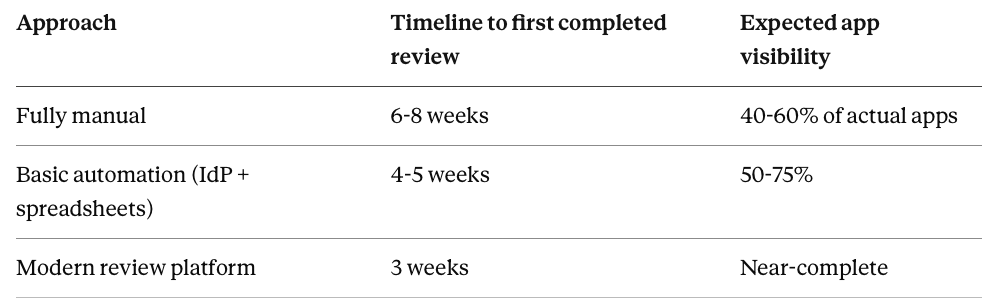
- Manual discovery combines three sources: your IdP's app catalog, Finance's expense reports, and department surveys asking "what does your team use?" Expect 40-60% coverage for 3-5 days of compilation work.
- Basic automation adds finance-system and CASB integration on top of the IdP, lifting coverage to 50-75%.
- Comprehensive discovery runs multiple methods simultaneously. Next-gen IGA platforms like Zluri use eight discovery methods at once: SSO/IdPs, direct integrations (300+ pre-built connectors), HRMS, finance and expense systems, browser extensions, MDMs, CASBs, and directories. Setup takes hours, collection runs about 72 hours, and coverage approaches complete.
Your week 1: export the IdP app and user list, request Finance's SaaS spend report, survey department heads, and compile the master list; expect two to three times what the IdP alone shows. If you're using a platform, connect SSO, HRMS, and finance sources and let discovery run for 72 hours. Most organizations discover dozens of apps they didn't know existed, and a meaningful share of those touch sensitive data. Partner with Finance early; they usually hold the most complete picture of actual SaaS spending.
If your first review only covers 20 apps but you actually have 100, you've reviewed 20% of your risk.The other 80% stays exposed, certified by nobody.
Step 2: Scope (Prioritization)
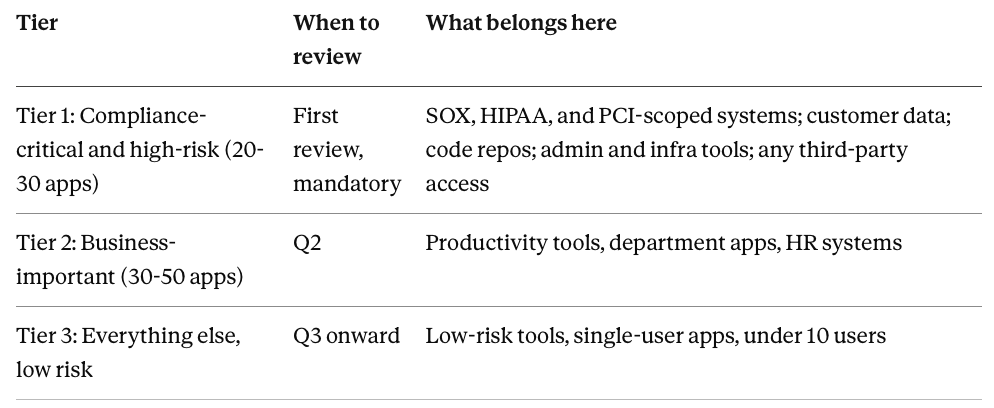
The classic first-review mistake is trying to review 2,000 users across 200 apps. The smart approach: start with 20-30 high-risk apps and expand each quarter.
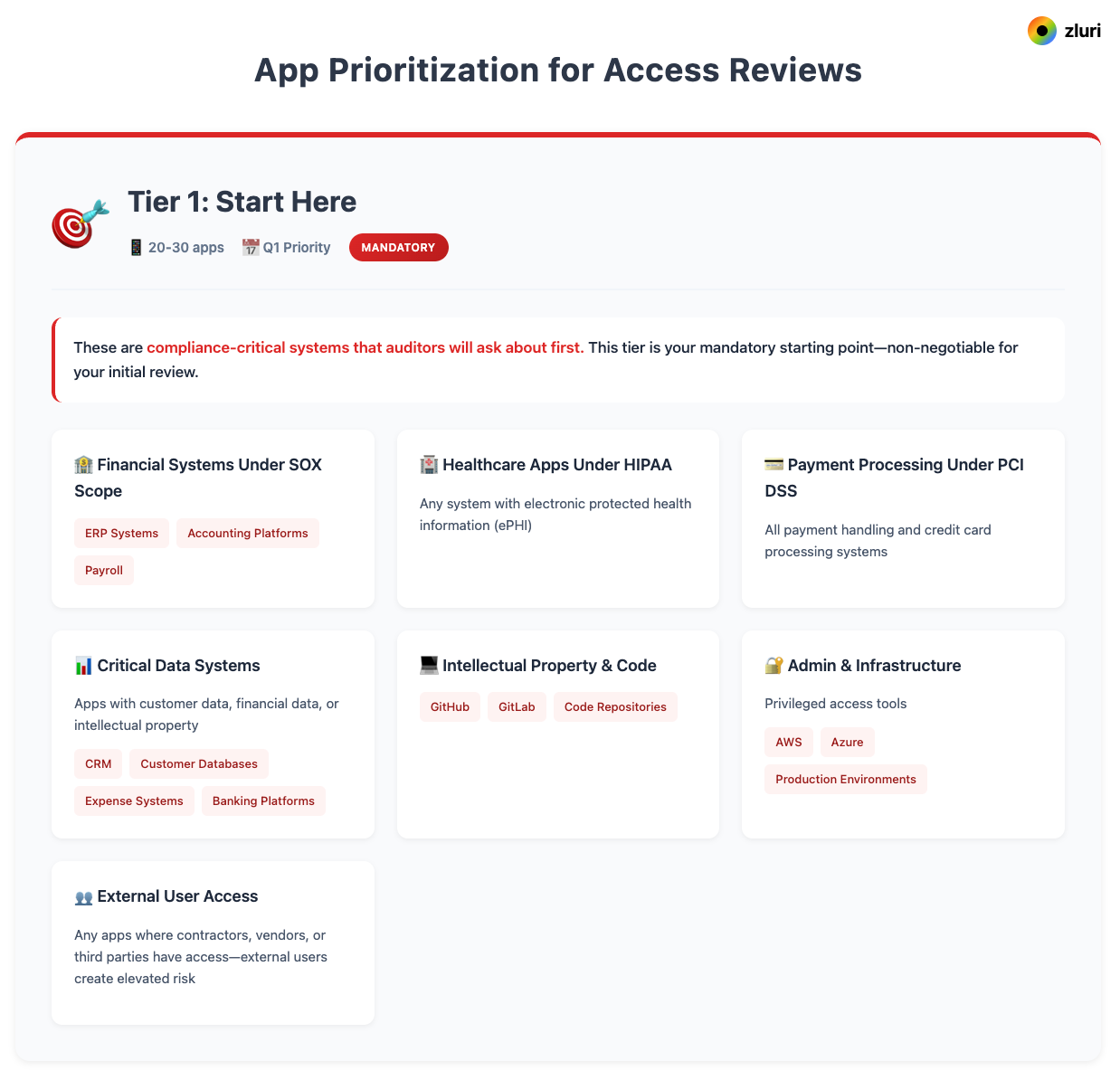
Tier 1 in full: financial systems under SOX scope (ERP, accounting, payroll), HIPAA apps holding ePHI, PCI payment systems, customer-data apps like your CRM and databases, IP repositories (GitHub, GitLab), admin and infrastructure tools (AWS, production environments), and any app where contractors, vendors, or other third parties hold access.
Then decide your review unit: users or groups. User-based review examines individuals across your scoped apps; it's comprehensive but heavy (500 users × 30 apps = 15,000 data points), best for companies under 100 people or reviews that must be exhaustive. Group-based review certifies SSO groups and their entitlements instead: 15-20 groups rather than 500 users, an order of magnitude faster, and aligned with how access is actually granted at most organizations. The decision rule is simple: if you grant access via SSO groups, go group-based; if access is mostly individual, go user-based; if it's a mix, use group-based for standard access and user-based only for privileged accounts.
One platform note: not every review tool supports group-level certification. Zluri supports both, and lets you mix them, which is the practical requirement for most 500-5,000 employee organizations.
Finishing week 1: lock your Tier 1 list, pull user lists and the SSO groups granting access to each app, calculate total data points, and write a one-line scope statement: "We're reviewing 25 apps, covering 500 users (or 18 SSO groups), focusing on finance, customer data, and admin access." Validate the Tier 1 list with Security and Compliance; they'll know which regulatory requirements should drive the ordering.
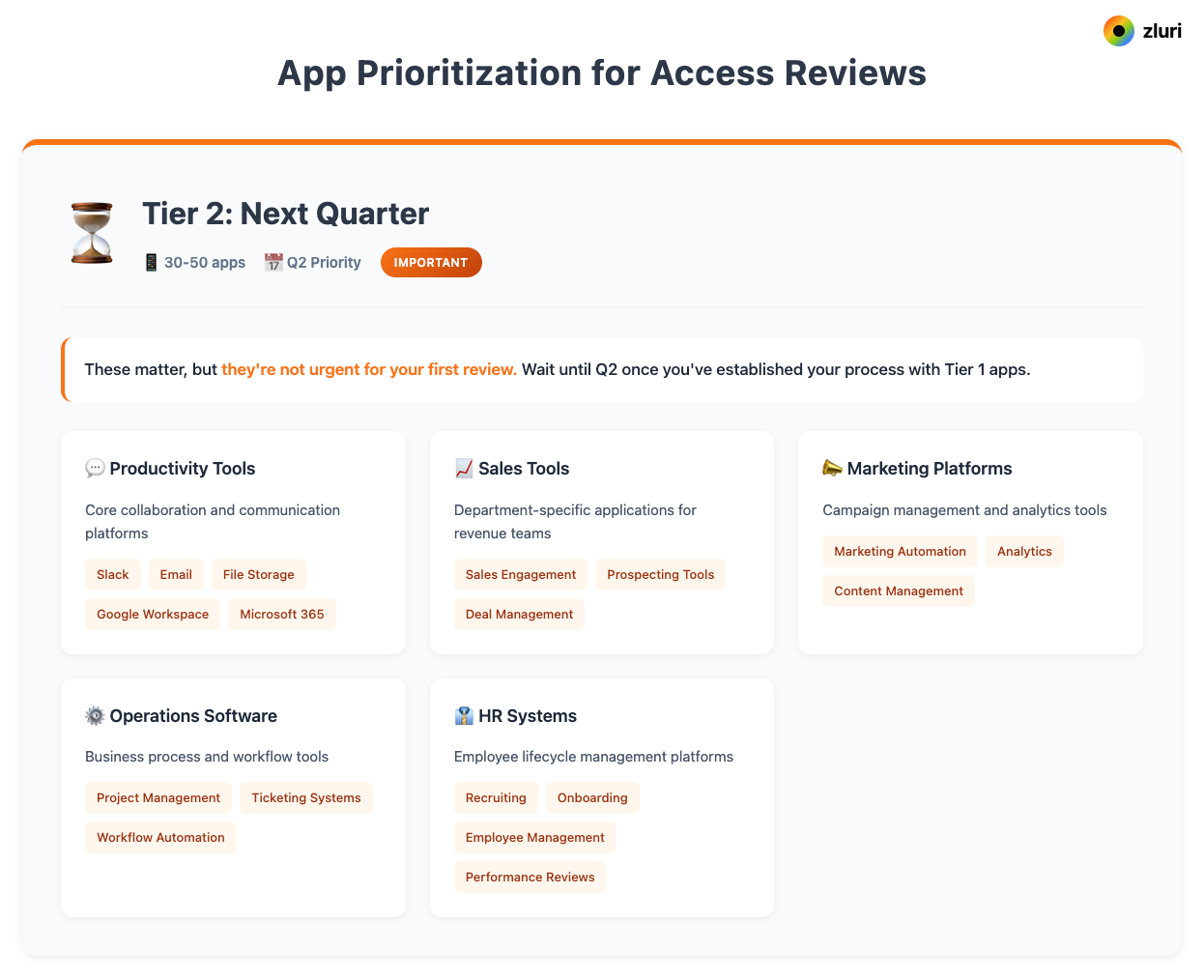
If you want a pre-built structure for all of this, start from our user access review template and run the pre-review checklist so nothing gets discovered mid-cycle.
Step 3: Assign (Who Reviews What)
This is where IT teams get stuck, usually by defaulting to "IT reviews everything." You're the orchestrator, not the solo performer; the right people need to make the access decisions.
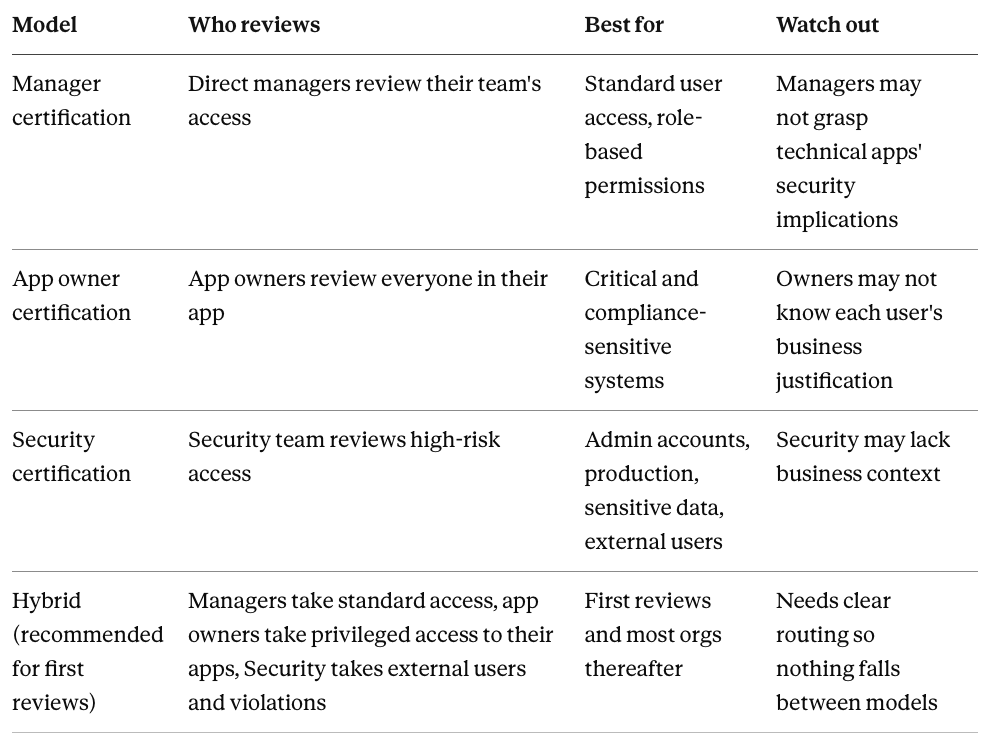
These four models, and how to choose between them as you scale, are covered in depth in our guide to access review delegation.
Your week 2 has three jobs:
- Map reviewers to scope, per app. Salesforce example: 200 standard users → sales managers; 5 admins → Salesforce admin plus Security; 10 external partners → Security.
- Configure the workflows. Single-level approval for most apps, multi-level for high-risk ones, with delegation enabled for reviewers on PTO.
- Brief every reviewer in 15 minutes. What they're reviewing, what criteria to apply (employment status, role fit, usage), what decisions they can make, and the deadline.
Platforms automate the mapping by pulling reporting structure from HRMS and sending briefing emails with dashboard links; manually, it's a spreadsheet of apps to reviewers plus email briefs and a shared folder for decisions.
Partner with Security to define the criteria for high-risk access before the campaign starts. They'll appreciate being consulted, and consulted teams stay engaged when escalations arrive.
Step 4: Review (Executing Certification)
Now reviewers make decisions, and you monitor progress and handle escalations.
What reviewers need to see is context, not a bare user-app pair. For each line: employment status, permission level, last login, usage frequency, and risk signals. The pattern reads at a glance. An engineer with daily GitHub admin usage: approve. The same engineer's Salesforce seat, untouched for 90+ days: easy denial. A never-accessed finance system viewer role with external data exposure: deny and investigate how it got there. Green means active and appropriate; yellow means investigate (dormant, unusual for the role); red means high risk (external access, unused admin rights, no justification).
Reviewers make one of four calls:
- Approve: access is appropriate; logged as certified
- Deny: access is inappropriate; triggers remediation
- Modify: right person, wrong level; downgrade admin to user
- Escalate: justification unclear; route to app owner or Security
Beat the fatigue problem before it starts. Reviewing 500 users individually means reviewers stop reading after the first 50. Smart bulking fixes this: auto-approve the clearly low-risk band (active employee, logged in within 30 days, role matches access, no anomalies), which typically clears 70-80% of the queue and points human attention at the 20-30% that needs it. Group-based review multiplies the effect: 15 groups instead of 500 users, same security outcome.
Your week 3: launch the campaign, let reviewers process assignments over a few days, send reminders to stragglers, stay available for escalations, and push to 90%+ completion. A typical healthy outcome: 90%+ certified, 5-10% denied, 3-5% escalated. And resist becoming the decision-maker of last resort; when managers escalate unclear cases, loop in Security or the app owner. You're facilitating, not owning every judgment call.
Step 5: Remediate & Document (Fix and Prove)
This is where first reviews traditionally die, and where closed-loop remediation separates working processes from paper ones.
The traditional path: export a CSV of denials, create tickets, and route each removal to whoever owns that app: IT for centrally managed tools, the sales head for Salesforce, the finance owner for NetSuite. Weeks later a chunk is still "in progress," and when the auditor asks you to prove all violations were fixed, "we have tickets" is not an acceptable answer.
The IdP-automation path: SSO-integrated apps get remediated in days via workflow; everything outside SSO (which is most of the SaaS estate) still runs on tickets.
The closed-loop path: click "Execute Remediation," done. Access is removed automatically via API for integrated apps (Zluri supports 300+), or through guided manual workflows for apps without APIs, with every action logged either way. Same auditor question, different answer: "Here's the complete report with timestamps."
Every remediation action should create evidence: what access was removed, who denied it and when, who executed the removal and when, proof the removal landed, and the elapsed time from decision to done. That last metric is the one auditors increasingly probe: the gap between "flagged for removal" and "actually removed."
The audit package auditors expect has four parts:
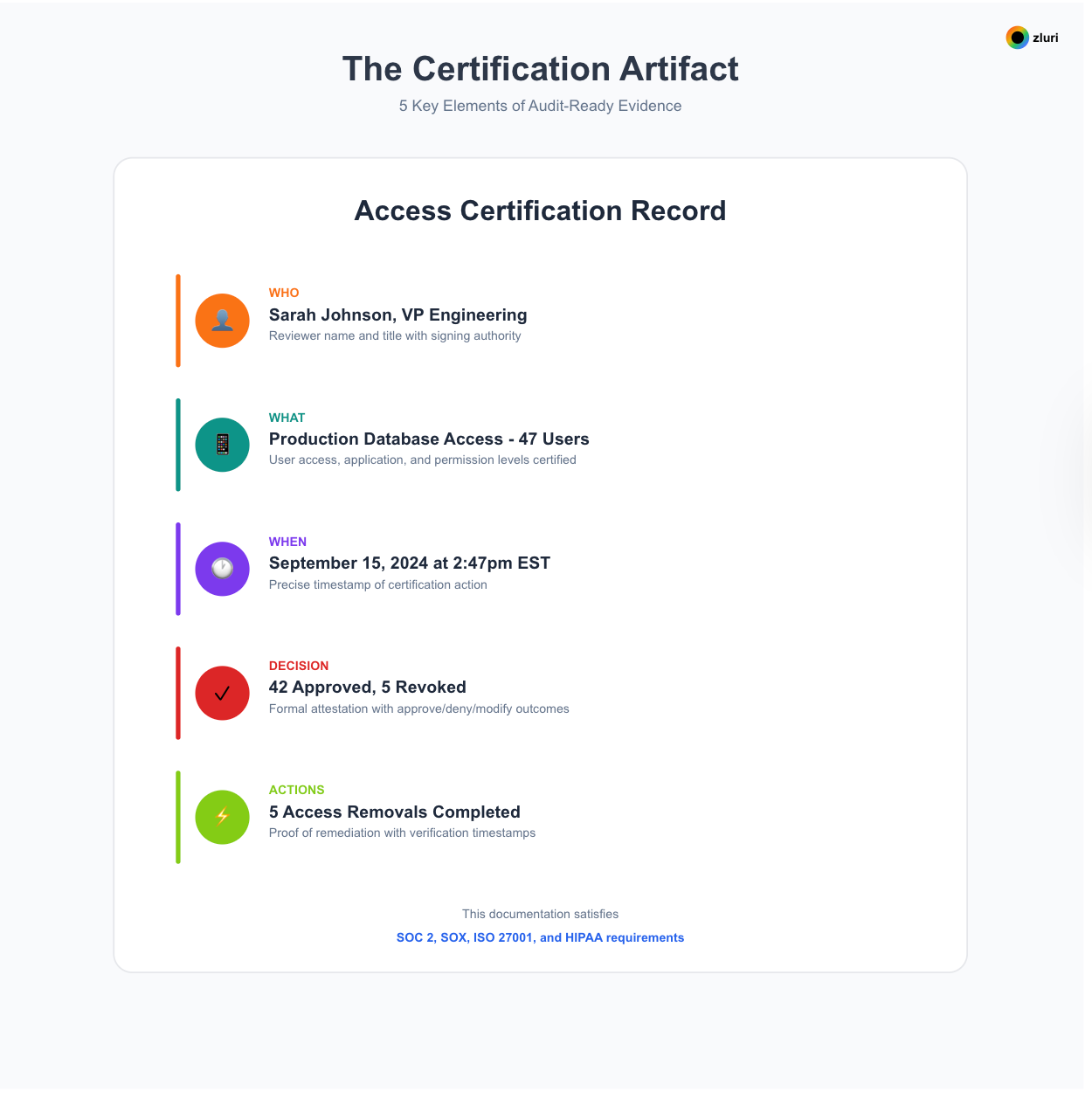
- Certification summary: users and access points reviewed, approve/deny/modify counts, completion rate
- Remediation report: violations identified, remediated immediately, remediated within 48 hours, outstanding with reasons
- Reviewer activity report: who participated, completion rates, time invested
- Evidence bundle: the full user list, every decision with timestamp, proof of every removal
Manually, budget one to two days of report compilation; platforms generate these automatically. One procurement check worth doing: some platforms cap audit log retention at 90 days behind a paywall; verify retention matches your compliance horizon.
Finishing week 3 (or week 6-8 manual): close the campaign, execute and verify all remediations, generate reports, document any exceptions with reasons, archive the evidence package, brief leadership, and schedule next quarter's review.
Common First-Review Mistakes
Trying to review everything. 200 apps and 2,000 users in review one guarantees overwhelm and incomplete results. Start with 20-30 high-risk apps.
No clear decision criteria. Reviewers who don't know what "good" looks like either approve everything or freeze. Give them one line: "Approve if active employee, logged in within 90 days, and role fits access."
Remediation with no follow-through. The review completes, tickets pile up, access stays. Either commit dedicated time to manual remediation or automate it; there is no third option that survives an audit.
No reviewer training. A 15-minute briefing on what, how, and what-happens-after is the cheapest quality improvement available.
Unrealistic timelines. "Everything in one week" produces rushed decisions. Three weeks automated or six to eight manual are both honest and achievable.
No documentation as you go. A review without an audit trail didn't happen, as far as your auditor is concerned.
IT doing everything alone. Discovery, decisions, remediation, and documentation on one team is a burnout plan. Partner with Security on criteria, Compliance on evidence requirements, and managers on the actual decisions.
Your First Review Won't Be Perfect, and That's the Point
The goal of the first review isn't perfection; it's the baseline. You'll find apps you didn't know existed, access nobody can justify, and gaps in your own process. The second review is faster, the third smoother, and by the fourth it's routine. For the step-by-step execution detail within each stage, who does what, in what order, with what evidence captured, our user access review procedure picks up where this framework ends. And once the first cycle closes, don't stop at completion; turn the findings into process fixes and expanded scope for Q2.
Choosing your path forward
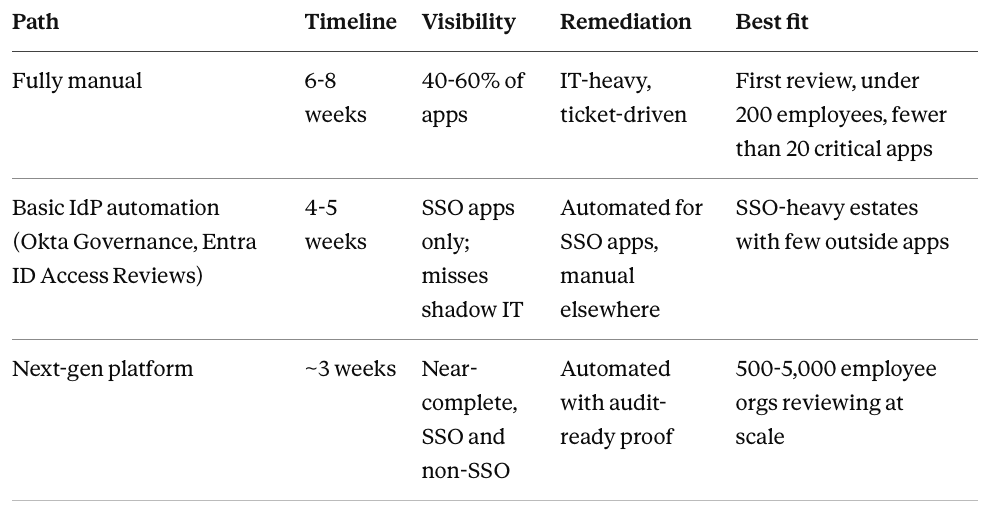
The framework is identical on every path; the tooling determines speed, completeness, and audit-readiness. If you go the platform route, group-based reviews and automated remediation are the two capabilities that change the math most.
Ready to see the setup end to end? The full walkthrough of configuring application-, group-, and user-based certifications, reviewer assignment, and remediation playbooks in Zluri is here: How Access Reviews Work in Zluri.
Frequently Asked Questions
What are the steps in a user access review process?
Five, in sequence: build visibility into every app and user, scope the review to high-risk apps first, assign reviewers using a hybrid of managers, app owners, and security, execute the certification with context on every line, and remediate every denial with documented proof. Each step depends on the one before it.
How long does it take to launch a first access review?
Roughly three weeks on a modern platform, four to five with basic IdP automation, and six to eight fully manual. The biggest variables are discovery (how fast you can see all your apps) and remediation (whether removals execute automatically or through tickets).
Who should perform the reviews?
Use a hybrid for your first cycle: direct managers certify standard user access, app owners certify privileged access to their applications, and the security team certifies external users and policy violations. IT orchestrates the process rather than making every decision.
How many apps should a first access review cover?
Start with 20 to 30 high-risk applications: compliance-scoped systems, customer and financial data, code repositories, admin tools, and anything with third-party access. Expand to the next tier in your second quarter rather than attempting everything at once.
What evidence should the review produce?
A certification summary, a remediation report showing every denial closed with timestamps, a reviewer activity report, and an archived evidence bundle covering every decision. Auditors specifically test whether denied access was actually removed, so proof of removal matters more than proof of review.


.svg)