Time-based access control restricts permissions to a defined window instead of granting them indefinitely. It sounds like a minor scheduling feature. It's actually a correction to the default failure mode of every access control system: access that was granted for a reason nobody wrote down, for a duration nobody specified, which is still active years after the reason expired. This guide covers what time-based access control is, the three ways it gets applied, and why treating "forever" as a decision rather than a default is the whole point.
Every access grant has an implicit duration, whether anyone states it or not. Most organizations never state it, which means the default duration is "forever," chosen by nobody, reviewed by nobody, and discovered only when an audit or an incident forces the question.
Time-based access control is the fix, and it's a narrower, more mechanical idea than the marketing usually makes it sound. It isn't a new philosophy of security. It's the discipline of attaching an expiry to an access grant at the moment the grant is made, so "forever" stops being the silent default and becomes something a person or a rule actually decided.
What Time-Based Access Control Is
Time-based access control restricts access to resources according to temporal rules, specific hours, particular days, defined date ranges, rather than granting it indefinitely once approved. The organization sets the window; the system enforces it, granting access when the window opens and revoking it when the window closes, without anyone having to remember either event.
The classic example is a contractor granted access for the length of an engagement rather than access that happens to also be used for the length of an engagement and then quietly persists. The distinction matters more than it sounds. Access "used for a month, then forgotten about" and access "granted for exactly a month, with automatic revocation" produce identical behavior for the first thirty days and completely different outcomes on day thirty-one.
Time can control three genuinely different things, and it's worth separating them because they solve different problems.
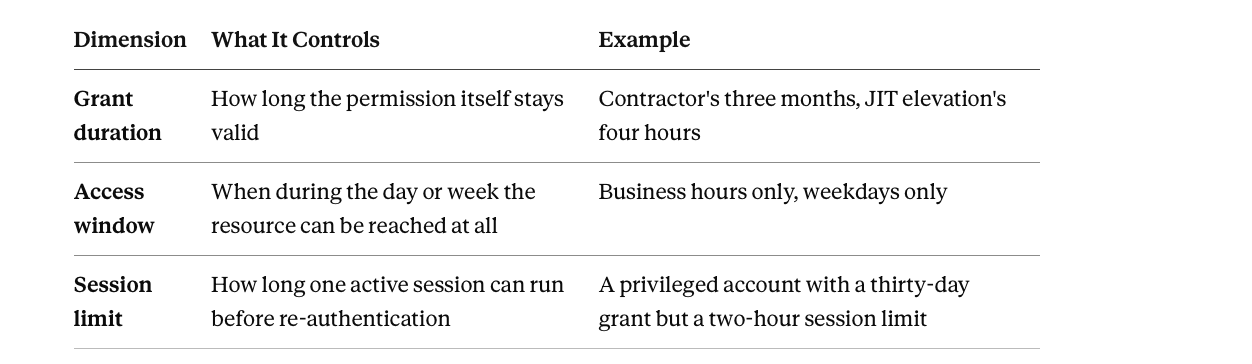
Session limit is independent of grant duration. A privileged account might carry a thirty-day grant but a two-hour session limit, so standing risk doesn't come from someone forgetting to log out. Most implementations only need the first dimension. The other two are situational, not default.
The Three Patterns, and When Each One Fits
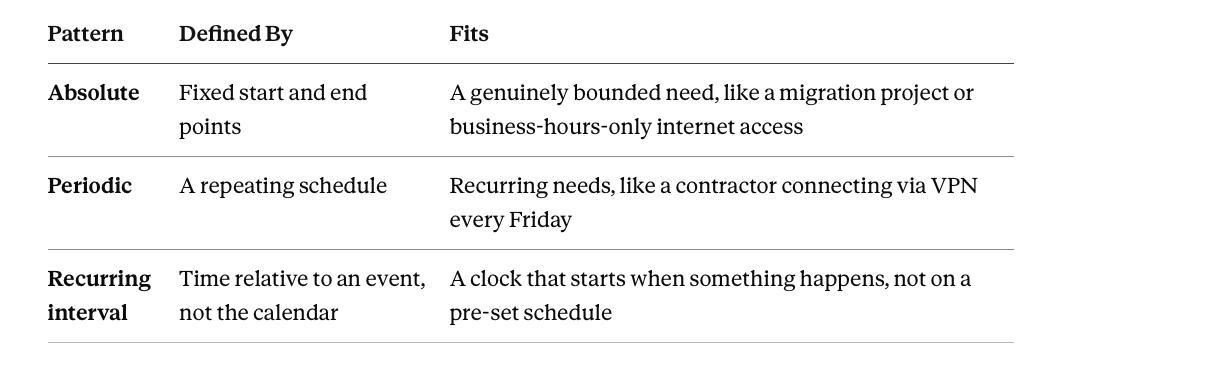
Absolute time-based access runs between fixed start and end points, a specific date and time to another specific date and time. This fits situations with a genuinely bounded need, restricting internet access to business hours, or granting a vendor system access for the exact span of a migration project. The window doesn't repeat and doesn't drift; it has a hard edge on both sides.
Periodic time-based access runs on a recurring schedule, defined not by a start and end date but by a repeating pattern, every Friday from 6 PM to 10 PM, every weekday during business hours. This fits genuinely recurring needs, a contractor who connects via VPN on a fixed weekly cadence, rather than a one-time engagement. The access isn't continuous, and it isn't a single window either. It's a pattern that repeats until someone deliberately turns it off.
Recurring interval access is defined relative to an event rather than to the calendar, seven days from account creation, thirty days from a password reset, rather than a fixed date. This fits scenarios where the relevant clock starts when something happens, not on a schedule set in advance, a returning employee needing temporary elevated access for their first week back, timed from their actual return date rather than a date guessed in advance.
The pattern to notice across all three: none of them require a human to remember an end date. The type you choose depends on whether the need has a fixed boundary, a repeating cadence, or a trigger, not on which one sounds more sophisticated.
Why This Is an Attribute, Not a Separate Model
Here's the reframing worth being precise about, because a lot of content treats time-based access control as its own category sitting next to RBAC and ABAC on a menu, alongside DAC and MAC, as though it competes with them for the same slot.
It doesn't. Time is an attribute. A rule that says "grant this access only between 9 AM and 6 PM" is an attribute-based access control rule with one condition, and that condition happens to be temporal instead of departmental or geographic. It sits in the same environmental category as device posture, network, and location, the conditions that describe the circumstances of the moment rather than who the person is or what job they hold. Framed this way, time-based access control isn't a fourth model. It's ABAC's clock.
This reframing has a practical payoff. It means time-based rules combine with everything else ABAC already does, rather than needing separate infrastructure. "Production access requires Role equals Engineer AND Employment Type equals Full-Time AND access occurs during business hours" is one rule with three conditions, not two different systems, RBAC for the role and something else entirely for the time window, bolted together. The time condition joins the same AND/OR logic as every other attribute, because that's structurally what it is.
Why Standing Access Is the Actual Target
The real argument for time-based access control isn't about business hours or bandwidth management, the framing older guides lean on. It's about standing privilege, access that exists continuously regardless of whether it's currently needed.
Permanent admin rights held "in case they're needed" are attackable at 3 AM on a Sunday exactly as much as at 2 PM on a Tuesday, even though the legitimate use case might only ever occur during business hours on a handful of days a year. The gap between "access that's needed sometimes" and "access that's granted permanently" is pure, uncompensated risk.
Time-based access control and just-in-time access are the same idea described from two directions:
- JIT access asks: grant this only for the window it's actually needed.
- Time-based access control asks: attach an expiry to this grant.
Same mechanism, same outcome. In practice, the two terms describe the identical discipline applied to privileged, elevated access specifically.
Break-glass access is the one legitimate exception worth naming. It's a deliberate, logged override that bypasses the normal approval step when an emergency can't wait for it, a production outage at 2 AM with no approver reachable. The override removes the approval delay while keeping the expiry and the audit trail intact. Break-glass without logging is just a permanent backdoor with a dramatic name, so the exception only works if every use of it generates the same record a normal approved request would.
Where the Practice Breaks Down
The expiry gets set as an afterthought, not at creation. Access gets granted first, urgently, and the question of when it should end gets deferred to "we'll clean it up later." Later rarely comes, because nobody's job is remembering an expiry date that was never actually recorded anywhere a system could enforce.
Manual revocation depends on someone remembering. A calendar reminder, a sticky note, a task assigned to an admin who leaves the company eight months before the access was supposed to expire. Every manual revocation process has a single point of failure, which is a specific person's memory on a specific day, and memory is not a control.
Automated revocation fails silently, and nobody checks. This is the subtler failure, because it looks identical to success from the outside. An integration breaks, a workflow errors out quietly, or an edge case in how an application handles deprovisioning means the expiry fires on schedule but the access doesn't actually get removed. The dashboard says the grant expired. The account can still log in. Automation without verification produces false confidence, which is worse than no automation, because no automation at least prompts someone to check manually.
Periodic and recurring access drifts from its original justification. The contractor's weekly VPN window, set up for a project that ended four months ago, keeps firing every Friday because the schedule itself has no awareness that its reason for existing is gone. Recurring access needs a recurring reason-check, not just a recurring grant.
Time-based rules get written without the attributes that should accompany them. A rule enforcing business hours only, with no accompanying role or department condition, ends up either too permissive, granting the wrong people access during the right window, or generates unnecessary friction for people who genuinely need the access outside standard hours for legitimate reasons. Time alone is rarely the complete rule; it's one condition among several.
Implementing It Properly
Attach the expiry at the moment of grant, not as a follow-up task. Every access decision should include a duration decision at the same time, made by the same person, in the same action. If the honest answer is "we don't know how long this should last," that's a signal to grant the shortest reasonable window and extend it explicitly later, rather than defaulting to permanent because nobody wanted to guess.
Automate the revocation, don't schedule a reminder to do it manually. The entire value of time-based access control collapses if enforcement depends on a human noticing the calendar. The system that granted the access on schedule needs to be the same system that revokes it on schedule, with no manual step in between.
Combine the time condition with the attributes that should scope it. Business hours alone is a weak rule. Business hours, for this role, on managed devices is a rule that actually reflects the real access decision, because it was never really about the clock in isolation.
Review recurring and periodic grants against their original justification, not just their schedule. A periodic grant firing correctly every week is not the same as a periodic grant that's still needed. Scheduled reviews should ask whether the underlying reason still holds, not just whether the automation is still running.
Treat every standing privileged grant as a time-based candidate by default. The question shouldn't be "does this need an expiry." It should be "why doesn't it," with permanent access requiring active justification rather than being the unexamined default.
Match the infrastructure to the problem, and don't build all of it at once. A duration set at provisioning time is a field and an expiry job. Self-service JIT elevation with approval routing and session monitoring is meaningfully heavier, and building it for a problem that's actually just orphaned contractor access is effort spent in the wrong place. Solve the standing-access problem that's actually costing you risk today, prove the workflow, then extend to the next one.
Let actual usage calibrate the duration, not the initial guess. A grant requested for eight hours but used for one, repeatedly, is a signal the default duration is miscalibrated, not that the requester is unusually cautious. This only works if the platform tracks requested duration against actual session activity, which is a visibility question as much as a policy one.
A Note on Terminology
Worth being precise here, because the standard vocabulary in this space describes runtime authorization, an engine evaluating conditions at the moment of every access request, in the request path, in real time. What this article and the implementation below describe operates at the governance layer instead. Access windows get evaluated at grant and revocation checkpoints, an onboarding, a scheduled expiry, a triggering event, rather than intercepting live requests as they happen. Same underlying idea, temporal conditions scoping access, applied where SaaS access is provisioned and governed rather than where an application makes a live, in-session authorization decision.
How Zluri Helps
Time-based access in Zluri isn't a separate feature bolted onto access management. It's a duration parameter available wherever access gets granted. This section covers the core mechanism; for the full breakdown of every temporal pattern Zluri supports, delayed start, bounded duration, date-anchored automation, and recurring reverification, see Implementing Time-Based Access Control in Zluri.
Access requests carry duration as a first-class field. The request can specify a time-bound window rather than defaulting to permanent, and automation rules evaluate that duration alongside every other attribute, department, role, requested license, when deciding whether to auto-approve, route for approval, or reject. A short-window request can auto-approve under conditions where the identical permanent request would route to a human.
Auto-remediation enforces expiry without anyone remembering the date. Once a duration is set, revocation at the end of that window happens automatically, closing the gap between "access was supposed to end" and "access actually ended" that manual processes reliably leave open.
Condition-based playbooks combine time with every other attribute in one rule. Because time is an attribute rather than a separate system, Add and Apply Conditions can scope access by role, department, and duration together in a single playbook.
Contractor and third-party access gets automatic expiration tied to the actual engagement. Access aligned with project timelines, rather than a guessed date, reduces the standing-access risk that accumulates around external identities specifically.
Dormant and unused access surfaces even when it technically hasn't expired. Some standing risk comes from access that was granted with no end date and simply never gets used, which continuous monitoring flags for review independent of whether any formal time window was ever set.
One honest boundary. Contextual time restrictions, blocking access outside business hours regardless of who's asking, are typically an identity provider's job, enforced through conditional access rules at the authentication layer, rather than something managed at the SaaS access governance layer. What Zluri governs well is grant duration and its full lifecycle, provisioning, tracking, expiring, auditing, which covers the large majority of real time-based access needs. Blocking logins by time of day for an already-authorized user is a narrower mechanism living closer to the identity provider.
Make Duration a Decision, Not a Default
Time-based access control is a narrower idea than it's usually presented as, attaching an expiry to a grant at the moment it's made, instead of leaving "forever" as the unexamined default. Absolute, periodic, and recurring are three shapes that decision can take, chosen by whether the need has a fixed boundary, a repeating cadence, or an event-driven trigger. And underneath all three, it's an attribute, time, evaluated the same way department or location gets evaluated, not a fourth model competing with RBAC and ABAC for a slot on a menu. The organizations that get this right don't have a more sophisticated scheduling system. They have a habit: every grant gets a duration decided on purpose, and every expiry gets enforced by a system instead of a memory.
Frequently Asked Questions
Is time-based access control the same as just-in-time access?
They're the same underlying discipline, described from two directions. JIT access asks for the minimum window a specific need requires, usually for privileged or elevated access. Time-based access control describes the broader mechanism, attaching any expiry to any access grant. In practice, JIT is time-based access control applied specifically to standing privilege.
What's the difference between the three types of time-based access?
Absolute access runs between two fixed dates and doesn't repeat. Periodic access runs on a recurring schedule, every Friday evening, for example, until deliberately turned off. Recurring interval access is measured from a triggering event rather than the calendar, seven days from account creation, for instance. The choice depends on whether the underlying need has a fixed boundary, a repeating pattern, or an event-driven start point.
Is time-based access control a separate access control model from RBAC or ABAC?
No. Time is an attribute, evaluated the same way department, location, or device posture would be. A rule requiring both a role and a time window is a single ABAC rule with two conditions, not two separate systems working together. Time-based access control is best understood as ABAC's temporal condition rather than a fourth model on the same list as RBAC and ABAC.
Why does standing privileged access matter more than restricting business-hours access?
Because standing access is a target continuously, regardless of when it's legitimately used. Permanent admin rights are exploitable at any hour, even if the real business need for them only arises occasionally. Restricting a login window to business hours addresses a narrower, lower-stakes problem than removing the vastly larger attack surface created by privileged access nobody ever bothered to time-bound.
What happens if a time-based access rule doesn't include any other conditions?
It tends to be either too permissive or too restrictive, because time alone rarely reflects the actual access decision an organization means to make. "Business hours only" with no role or department attached grants the right window to the wrong people. Combining the time condition with the attributes that should scope it, role, department, device, produces the rule the organization actually intended.
If revocation is automated, is the expiry problem fully solved?
Not automatically. Automated revocation removes the memory-dependency failure but introduces a quieter one: the automation can fail silently, an integration breaks, a workflow errors out, and the dashboard shows an expired grant while the account can still log in. Automation needs to be paired with verification, confirming access actually ended, not just that the expiry job ran, or it produces false confidence instead of real security.


.svg)